
Typing is one of the most physical things you do at a desk all day. The keyboard you use affects how fast you work, how your fingers feel after hours of typing, and whether your setup feels satisfying or frustrating. A good mechanical keyboard makes a real difference.
We compared the 5 best-selling mechanical keyboards on Amazon for office use and productivity — covering layout, switch type, connection, and overall value.
Quick Comparison Table
| Keyboard | Layout | Switches | Connection | Best For | Price |
|---|---|---|---|---|---|
| AULA F75 Pro | 75% | Hot-swap (pre-lubed) | BT / 2.4GHz / USB-C | Budget Pick | ~$50 |
| Logitech K845 | Full-size | TTC Red | Wired USB | Best Wired | ~$55 |
| Logitech MX Mechanical Mini | 75% | Low-profile clicky | BT / USB | Best Compact | ~$130 |
| Logitech MX Mechanical | Full-size | Tactile quiet | BT / USB-C | Best Overall | ~$150 |
| Logitech K845ch (Cherry MX) | Full-size | Cherry MX Red | Wired USB | Best Cherry MX | ~$70 |
Now let’s break down each keyboard in detail.
1. AULA F75 Pro — Best Budget Pick

At around $50, the AULA F75 Pro punches well above its price. It’s a 75% layout keyboard that packs in hot-swappable switches, triple connectivity, PBT keycaps, and a volume knob — features you’d typically expect from keyboards twice the price.
Key Specs:
- Layout: 75% (compact with function row and arrow keys)
- Switches: Hot-swappable, pre-lubed (multiple switch options available)
- Connectivity: Bluetooth 5.0, 2.4GHz wireless, and USB-C wired
- Battery: Large capacity for wireless use
- Keycaps: Double-shot PBT
- Extra: Volume knob, south-facing RGB
- OS support: Windows and macOS
What we like:
- Hot-swap sockets mean you can change switches without soldering
- Pre-lubed switches feel smooth right out of the box
- Three connection modes cover every use case
- PBT keycaps resist shine and feel premium for the price
- Volume knob is genuinely useful for day-to-day work
- RGB lighting is vibrant without being over the top
What could be better:
- Build quality is good but not quite at the level of higher-end boards
- Software for customization is basic
- Wireless latency is slightly higher than top-tier gaming keyboards (though fine for typing)
- No number pad — may not suit users who rely on it heavily
Best for: Anyone who wants a capable, versatile mechanical keyboard without spending a lot. Great for first-time mechanical keyboard users or anyone experimenting with different switches.
2. Logitech K845 — Best Wired Keyboard
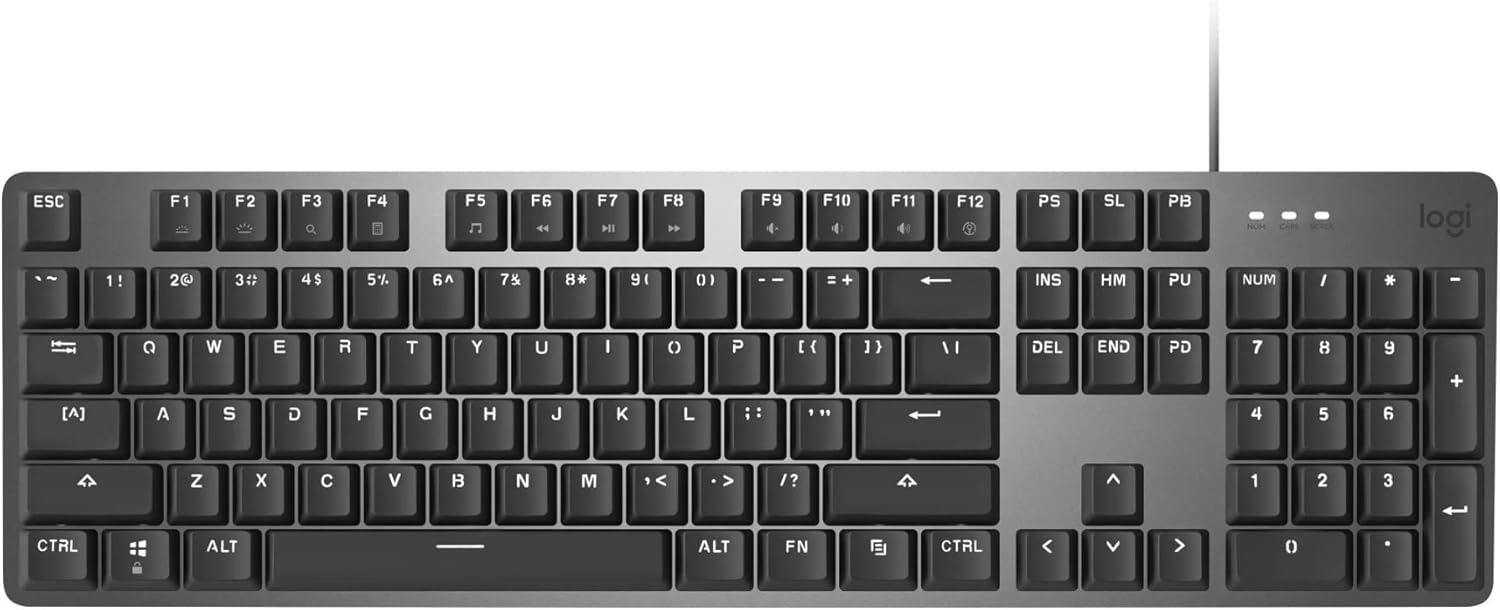
The Logitech K845 is a no-nonsense full-size mechanical keyboard built for office work. It features an aluminum top case, TTC Red switches, and a clean wired design — all at a very reasonable price.
Key Specs:
- Layout: Full-size (with number pad)
- Switches: TTC Red (linear, smooth, quiet)
- Connectivity: USB wired
- Frame: Aluminum top plate
- Backlighting: White LED, single-zone
- Tilt: Three-angle adjustable feet
- OS support: Windows
What we like:
- Aluminum top plate gives a solid, premium feel
- TTC Red switches are smooth and quiet for an open office
- Full-size layout includes dedicated number pad and function keys
- Adjustable tilt lets you find a comfortable typing angle
- Reliable plug-and-play — no software required
- Backlit keys are easy to see in low light
What could be better:
- Wired only — no wireless option
- White single-zone backlighting (no RGB)
- Windows only — not recommended for macOS users
- TTC switches, while good, are not as well-known as Cherry MX or Gateron
- No USB passthrough or media controls
Best for: Office workers who want a reliable, well-built wired mechanical keyboard with a full layout. Ideal for those who prefer a simple, wired setup with no battery to manage.
3. Logitech MX Mechanical Mini — Best Compact Keyboard

The Logitech MX Mechanical Mini is designed for people who want a serious productivity keyboard in a compact, portable package. It uses low-profile switches for a flatter typing feel and pairs wirelessly with up to three devices.
Key Specs:
- Layout: 75% compact (no number pad)
- Switches: Low-profile clicky (Kailh Choc-style)
- Connectivity: Bluetooth (3 devices) and USB-C Logi Bolt receiver
- Battery: Up to 15 days backlit, 10 months without backlighting
- Smart backlighting: Proximity sensor, auto on/off
- OS support: Windows, macOS, Linux, iPadOS, Android
What we like:
- Low-profile switches require less force and finger travel — less fatigue over long sessions
- Multi-device pairing makes it great for multi-computer setups
- Works across macOS, Windows, and Linux right out of the box
- Smart backlighting saves battery and is genuinely useful
- Compact form factor frees up desk space
- Quality build with premium materials
What could be better:
- Clicky switches may be too loud for shared office spaces
- No number pad — may not suit accountants or data entry users
- Higher price than budget options
- Low-profile switches feel different from traditional mechanical switches — takes adjustment
- Battery life with backlighting on is shorter than some competitors
Best for: Professionals who work across multiple computers or operating systems and want a compact, wireless keyboard with a distinctly modern feel. Great for travel or minimal desk setups.
4. Logitech MX Mechanical — Best Overall

The Logitech MX Mechanical is the keyboard we’d recommend to most productivity-focused professionals. It combines a full-size layout, tactile quiet switches, wireless multi-device connectivity, and smart backlighting in one polished package.
Key Specs:
- Layout: Full-size (with number pad)
- Switches: Low-profile tactile quiet (Kailh Choc Brown-style)
- Connectivity: Bluetooth (3 devices) and USB-C Logi Bolt receiver
- Battery: Up to 15 days backlit, 10 months without
- Smart backlighting: Proximity sensor, typing-activated illumination
- OS support: Windows, macOS, Linux, iPadOS, Android
- USB-C charging
What we like:
- Tactile quiet switches give satisfying feedback without loud noise — ideal for open offices
- Full-size layout with number pad suits all types of work
- Multi-device Bluetooth pairing with easy switching
- Works across all major operating systems
- Smart backlighting adapts to the environment and saves battery
- USB-C charging is modern and convenient
- Premium build quality throughout
What could be better:
- Low-profile switches are not for everyone — traditional switch lovers may prefer standard height
- Higher price point than wired alternatives
- No hot-swap — you’re locked into the switch type you order
- Larger footprint than compact alternatives
Best for: Office professionals who want the best all-around mechanical keyboard for productivity, regardless of which OS or how many computers they work on. This is the keyboard you buy once and use for years.
5. Logitech K845ch (Cherry MX) — Best Cherry MX Keyboard

The Logitech K845ch is the Cherry MX version of the K845. If you specifically want the reliability and feel of genuine Cherry MX switches — the gold standard in mechanical keyboards — this is the most affordable way to get them in a well-built Logitech body.
Key Specs:
- Layout: Full-size (with number pad)
- Switches: Cherry MX Red (linear, smooth, light actuation)
- Connectivity: USB wired
- Frame: Aluminum top plate
- Backlighting: White LED, single-zone
- Tilt: Adjustable feet
- OS support: Windows
What we like:
- Genuine Cherry MX switches — proven, long-lasting, and widely praised
- Cherry MX Red switches are smooth and quiet — great for fast typists
- Aluminum top plate is solid and durable
- Full-size layout with all the keys you’d expect
- Clean, professional look that fits any office setup
- No bloatware or required software
What could be better:
- Wired only — no wireless option
- No RGB — white backlighting only
- Windows-focused — limited macOS support
- Slightly more expensive than the TTC Red version (K845) without major additional benefits for most users
- No media controls or programmable keys
Best for: Users who specifically want Cherry MX switches in a reliable, full-size keyboard. Also a great pick for IT professionals or power users who trust Cherry MX’s long-term durability track record.
Which Keyboard Should You Buy?
Here’s a quick decision guide based on your situation:
- Tight budget but want real features? → AULA F75 Pro — hot-swap, wireless, and PBT keycaps for ~$50
- Want a reliable wired keyboard with no fuss? → Logitech K845 — solid aluminum, plug-and-play simplicity
- Work across multiple devices or operating systems? → Logitech MX Mechanical Mini — compact, wireless, multi-OS
- Want the best all-around keyboard for serious productivity? → Logitech MX Mechanical — full-size, wireless, quiet tactile switches
- Specifically want Cherry MX switches? → Logitech K845ch — the most affordable route to genuine Cherry MX
The right mechanical keyboard depends on your workflow, your desk setup, and how you type. But any of these five will be a genuine upgrade over a standard membrane keyboard — your fingers will notice the difference within an hour.